Skip to content

NVISAGE N1 Launch Monitor

Save $1,250.00 Save $1,250.00
Original price $6,245.00
Original price $6,245.00 - Original price $6,245.00
Original price $6,245.00
Current price $4,995.00
$4,995.00 - $4,995.00
Current price $4,995.00
Free Shipping

Why Launch Monitors Are a Strong Fit for Golf Simulators

  • Data that drives practice - Connects ball and club feedback to better indoor training decisions without overpromising results.
  • Indoor setup fit - Helps buyers think through hitting area, monitor placement, and room depth before ordering.
  • Software ecosystem clarity - Keeps simulator software, subscriptions, and device compatibility visible during the buying decision.
  • Upgrade path planning - Positions the monitor as the core technology choice that should match the room, budget, and long-term simulator goals.
  • Expert launch monitor fit help - Call or text (855) 718-4560 and Golf Sim Genies will help compare data needs, software fit, and indoor placement before you buy.
Expert Setup Support Warranty Support Path

Product Details

NVISAGE N1 Launch Monitor

Launch monitor details organized by placement, ball and club data, software fit, room requirements, included items, and support before checkout.

NVISAGE N1 Launch Monitor

Use this launch monitor page to confirm hitting position, room fit, data and software needs, and any add-ons required for your simulator setup.

  • Placement: Confirm right/left handed use, hitting position, indoor space, and required clearance.
  • Data/software: Review included data points, software path, subscriptions, and PC or tablet requirements.
  • Room fit: Match the launch monitor to your enclosure, mat, screen, and available ball flight.

Full product details

Description

The NVISAGE N1 Launch Monitor is an affordable, high-precision overhead launch monitor packed with advanced features.

Designed to redefine how golfers visualize their ball flight, the NVISAGE N1 integrates seamlessly with third-party golf simulator software such as GSPro and E6 Connect, providing an immersive and data-driven experience.

For maximum accuracy, the NVISAGE N1 requires specially crafted balls, ensuring precise data collection for game analysis and improvement. Whether you're fine-tuning your swing at the driving range or exploring virtual courses, this launch monitor brings realistic gameplay and engaging simulations to life.

Easily mount your NVISAGE N1 Launch Monitor to a Carl's Place C-Series Pro Enclosure using the NVISAGE N1 Frame Mount for a clean and professional setup.

Product Features

Overhead Launch Monitor Design – Mounted overhead to stay out of your swing path, maximizing space for uninterrupted practice. Easily attaches to Carl's Place Pro Enclosure using the NVISAGE Frame Mount.

High-Speed Cameras & Advanced Physics Engine – Equipped with cutting-edge sensors and a PhysX 6D Physics Engine, capturing every detail of your swing for a more precise and immersive golfing experience.

Spacious Hitting Zone – A 24-inch-deep by 20-inch-wide hitting area provides ample space for teeing up, making it easy to use while offering flexibility in tighter setups.

Instant Performance Insights – Multi-camera setup delivers real-time feedback by capturing detailed swing data from multiple angles for a comprehensive performance analysis.

Seamless Third-Party Integration – Fully compatible with leading golf simulator software like GSPro and E6 Connect, allowing golfers to analyze data and play virtual courses without being restricted to proprietary software.

What's Included

What's Included with the NVISAGE N1 Launch Monitor:

  • Launch Monitor Sensor
  • Mounting Plate
  • Calibration Board
  • Power Adapter with Cable
  • Ethernet Cable
  • Mounting Screws
  • Leveling Tool
  • 12 Premium Marked Golf Balls

What's Measured

Advanced Tracking & Realistic Gameplay

The NVISAGE N1 Launch Monitor utilizes dual 2,000 FPS cameras to track ball rotation and trajectory, delivering an immersive and lifelike experience powered by the PhysX 6D Physics Engine. To ensure maximum accuracy, the NVISAGE N1 requires marked balls featuring a specially designed dot pattern.

Tracked Data Parameters (Using Marked Balls):

  • Club Speed
  • Ball Speed
  • Launch Angle
  • Spin Axis
  • Horizontal Launch Angle
  • Back Spin
  • Side Spin
  • Total Spin (calculated)

Compatible Golf Simulator Software:

The NVISAGE N1 requires golf simulator software and integrates seamlessly with:

  • GSPro – One of the most realistic golf simulators available, featuring 4K graphics, true-to-life ball flight and roll, and a vibrant online community. Practice on downloadable courses, compete in skill challenges, or play matches across 300+ courses locally or online.
  • E6 Connect – Perfect for teaching, training, and competition, E6 Connect is widely used in driving ranges, commercial facilities, and home golf simulators. Play in leagues, online tournaments, or casual rounds with family and friends.

Requirements

PC Requirements

The NVISAGE N1 Launch Monitor relies on third-party software, so it's essential to check the recommended specifications for your chosen software. Below are the minimum requirements:

  • Processor: Intel i5 8400 (Not compatible with Apple iOS or Mac OS)
  • RAM: 8 GB
  • Graphics Card: GeForce GTX 1060 (For AMD: 3rd Gen Ryzen or higher, AMD Ryzen 3600X or higher; AMD 2700 not compatible)
  • Operating System: Windows 10 (64-bit) Version 1803 or higher
  • Network: Ethernet port required (Wi-Fi not supported)

Space Requirements

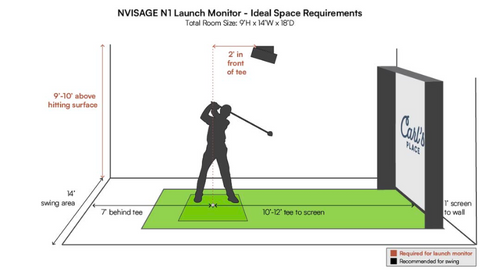
  • Mounting Height: 9-10 feet above the hitting surface
  • Positioning: 2 feet in front of the hitting area
  • Minimum Distance to Impact Screen: 10 feet (from hitting area)
  • Total Distance from Impact Screen: Approximately 8 feet

Proper placement ensures optimal tracking accuracy and a seamless golf simulation experience.
Specifications

NVISAGE N1 Specifications

  • Dimensions: 21.8" L x 6.9" W x 4.9" H
  • Weight: 19.2 lbs
  • Mounting Location: Overhead
  • Mounting Position: 9-10 feet overhead, 2 feet in front of the tee
  • Hitting Zone: 24" x 20"
  • Cameras: (2) 2,000 FPS cameras
  • Software Compatibility: GSPro, E6 CONNECT (more to be added in the future)

Shipping Time

Processing Time:
All orders are typically processed within 1–2 business days.

Delivery Time:
Once shipped, orders are estimated to arrive within 7–10 business days.

Tracking Information:
Once your order has been shipped, you'll receive an email with tracking details so you can monitor your delivery status.

How to Check Order Status:
To check your order status, email us at support@golfsimgenies.com with your 5-digit order number. You may also call or text us at 855-718-4560 for assistance.

NOTE: Delivery times are subject to change and may vary based on carrier delays or other circumstances beyond our control. If any changes occur, we will make every effort to notify you promptly.

Description

NVISAGE N1 Launch Monitor

Use this launch monitor page to confirm hitting position, room fit, data and software needs, and any add-ons required for your simulator setup.

  • Placement: Confirm right/left handed use, hitting position, indoor space, and required clearance.
  • Data/software: Review included data points, software path, subscriptions, and PC or tablet requirements.
  • Room fit: Match the launch monitor to your enclosure, mat, screen, and available ball flight.

Full product details

Description

The NVISAGE N1 Launch Monitor is an affordable, high-precision overhead launch monitor packed with advanced features.

Designed to redefine how golfers visualize their ball flight, the NVISAGE N1 integrates seamlessly with third-party golf simulator software such as GSPro and E6 Connect, providing an immersive and data-driven experience.

For maximum accuracy, the NVISAGE N1 requires specially crafted balls, ensuring precise data collection for game analysis and improvement. Whether you're fine-tuning your swing at the driving range or exploring virtual courses, this launch monitor brings realistic gameplay and engaging simulations to life.

Easily mount your NVISAGE N1 Launch Monitor to a Carl's Place C-Series Pro Enclosure using the NVISAGE N1 Frame Mount for a clean and professional setup.

Product Features

Overhead Launch Monitor Design – Mounted overhead to stay out of your swing path, maximizing space for uninterrupted practice. Easily attaches to Carl's Place Pro Enclosure using the NVISAGE Frame Mount.

High-Speed Cameras & Advanced Physics Engine – Equipped with cutting-edge sensors and a PhysX 6D Physics Engine, capturing every detail of your swing for a more precise and immersive golfing experience.

Spacious Hitting Zone – A 24-inch-deep by 20-inch-wide hitting area provides ample space for teeing up, making it easy to use while offering flexibility in tighter setups.

Instant Performance Insights – Multi-camera setup delivers real-time feedback by capturing detailed swing data from multiple angles for a comprehensive performance analysis.

Seamless Third-Party Integration – Fully compatible with leading golf simulator software like GSPro and E6 Connect, allowing golfers to analyze data and play virtual courses without being restricted to proprietary software.

What's Included

What's Included with the NVISAGE N1 Launch Monitor:

  • Launch Monitor Sensor
  • Mounting Plate
  • Calibration Board
  • Power Adapter with Cable
  • Ethernet Cable
  • Mounting Screws
  • Leveling Tool
  • 12 Premium Marked Golf Balls

What's Measured

Advanced Tracking & Realistic Gameplay

The NVISAGE N1 Launch Monitor utilizes dual 2,000 FPS cameras to track ball rotation and trajectory, delivering an immersive and lifelike experience powered by the PhysX 6D Physics Engine. To ensure maximum accuracy, the NVISAGE N1 requires marked balls featuring a specially designed dot pattern.

Tracked Data Parameters (Using Marked Balls):

  • Club Speed
  • Ball Speed
  • Launch Angle
  • Spin Axis
  • Horizontal Launch Angle
  • Back Spin
  • Side Spin
  • Total Spin (calculated)

Compatible Golf Simulator Software:

The NVISAGE N1 requires golf simulator software and integrates seamlessly with:

  • GSPro – One of the most realistic golf simulators available, featuring 4K graphics, true-to-life ball flight and roll, and a vibrant online community. Practice on downloadable courses, compete in skill challenges, or play matches across 300+ courses locally or online.
  • E6 Connect – Perfect for teaching, training, and competition, E6 Connect is widely used in driving ranges, commercial facilities, and home golf simulators. Play in leagues, online tournaments, or casual rounds with family and friends.

Requirements

PC Requirements

The NVISAGE N1 Launch Monitor relies on third-party software, so it's essential to check the recommended specifications for your chosen software. Below are the minimum requirements:

  • Processor: Intel i5 8400 (Not compatible with Apple iOS or Mac OS)
  • RAM: 8 GB
  • Graphics Card: GeForce GTX 1060 (For AMD: 3rd Gen Ryzen or higher, AMD Ryzen 3600X or higher; AMD 2700 not compatible)
  • Operating System: Windows 10 (64-bit) Version 1803 or higher
  • Network: Ethernet port required (Wi-Fi not supported)

Space Requirements

  • Mounting Height: 9-10 feet above the hitting surface
  • Positioning: 2 feet in front of the hitting area
  • Minimum Distance to Impact Screen: 10 feet (from hitting area)
  • Total Distance from Impact Screen: Approximately 8 feet

Proper placement ensures optimal tracking accuracy and a seamless golf simulation experience.

Specifications

NVISAGE N1 Specifications

  • Dimensions: 21.8" L x 6.9" W x 4.9" H
  • Weight: 19.2 lbs
  • Mounting Location: Overhead
  • Mounting Position: 9-10 feet overhead, 2 feet in front of the tee
  • Hitting Zone: 24" x 20"
  • Cameras: (2) 2,000 FPS cameras
  • Software Compatibility: GSPro, E6 CONNECT (more to be added in the future)

Shipping Time

Processing Time:
All orders are typically processed within 1–2 business days.

Delivery Time:
Once shipped, orders are estimated to arrive within 7–10 business days.

Tracking Information:
Once your order has been shipped, you'll receive an email with tracking details so you can monitor your delivery status.

How to Check Order Status:
To check your order status, email us at support@golfsimgenies.com with your 5-digit order number. You may also call or text us at 855-718-4560 for assistance.

NOTE: Delivery times are subject to change and may vary based on carrier delays or other circumstances beyond our control. If any changes occur, we will make every effort to notify you promptly.

Specs

Metrics & specs to confirm

  • Configuration: Review the selected product options and any variant-specific differences before adding to cart.
  • Room fit: Confirm measurements, placement needs, cables, mounts, software, or install requirements tied to this product type.
  • Source of truth: The product description and selected options on this page remain the exact product reference.
What's Included

What to verify is included

  • Core product: Confirm the selected model, size, length, material, software path, or configuration shown on this page.
  • Accessories and add-ons: Related simulator parts, mounts, cables, computers, projectors, software, or installation items are only included when explicitly listed.
  • Exact contents: Review the existing product description before checkout for any included/not-included notes.
Shipping & Returns

Shipping & returns

  • Shipping: Lead times, freight requirements, and delivery methods vary by product, brand, and configuration.
  • Large items: Oversized simulator components may require freight delivery, appointment scheduling, or extra receiving space.
  • Returns: Review eligibility before ordering, especially for oversized, custom, opened, or installed products.
Support

Support and fit guidance

  • Support path: Manufacturer support depends on the product and brand, and Golf Sim Genies helps route questions to the right next step.
  • Simulator-first support: Get help matching the launch monitor, package, enclosure, projector, and computer path before checkout.
  • Fit check before checkout: Ask before ordering if you are unsure about compatibility, dimensions, software, or installation needs.

Before You Order

Product Purchase FAQ

How long does shipping take?

Shipping timelines vary by brand, product, configuration, and freight requirements. Contact Golf Sim Genies before ordering if timing is critical.

How does warranty support work?

Warranty coverage depends on the manufacturer and product. Golf Sim Genies helps route warranty questions to the right support path for the equipment purchased.

Can you help with installation planning?

Yes. Share your room size, ceiling height, launch monitor plan, screen or enclosure size, projector path, and computer needs before ordering.

What is included in the box?

The selected product options, bundle widget, and product details on this page are the source of truth for included items. Accessories are only included when explicitly shown.

Do I need a simulator computer?

Computer requirements depend on the launch monitor, simulator software, projector/display setup, and graphics settings. Ask before ordering if you are unsure.

Can I return this product?

Return eligibility can vary by product type, supplier-shipped equipment, freight shipment, custom item, and product condition. Review the Refund Policy before ordering.

Compare products

{"one"=>"Select 2 or 3 items to compare", "other"=>"{{ count }} of 3 items selected"}

Select first item to compare

Select second item to compare

Select third item to compare

Compare